

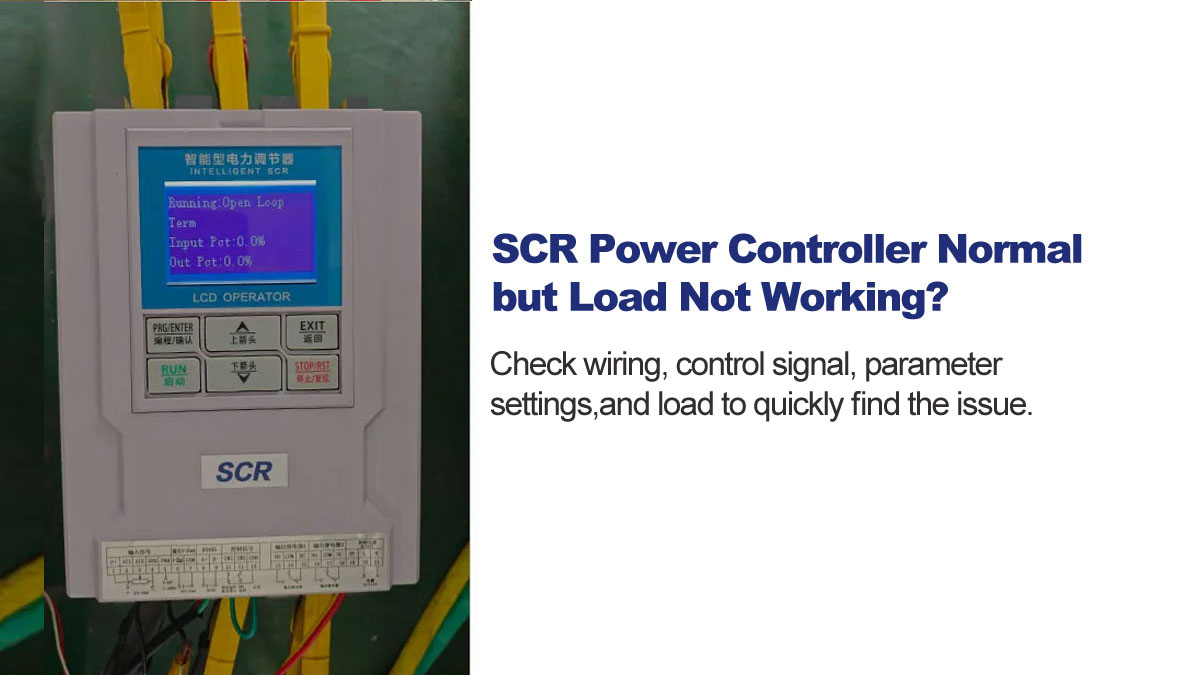
When an SCR power controller displays normal status — no alarms, no fault codes — but the connected load produces no heat or movement, the instinct is to suspect a hardware failure. In most cases, it isn't. The controller is working exactly as configured; the problem is usually in the wiring, the control signal, the parameter settings, or the load itself.
This guide covers the four most common causes and how to check each one systematically.
Check Wiring and Terminal Connections First
Loose or incorrect wiring is the most common cause of this symptom, and the easiest to overlook because nothing looks wrong from the outside.
Check for:
- Loose output terminals — SCR power controllers carry high current; a terminal that feels tight by hand may still be under-torqued
- Oxidized or corroded connectors affecting contact resistance
- Output terminals wired incorrectly — confirm load is connected to output, not input
- Phase sequence errors on three-phase installations
Tighten all terminals to the specified torque and inspect for signs of arcing or heat discoloration before proceeding to other checks.
Verify the Control Signal
If the controller receives no valid control signal, it will hold output at zero while displaying normal operating status. This is correct behavior, not a fault.
Common control signal problems:
- Signal cable disconnected or broken between the PLC or temperature controller and the SCR input
- Reversed polarity on a 4–20mA input — no signal reaches the controller
- Signal type mismatch — a 0–10V source connected to a 4–20mA input produces no usable signal
- Electromagnetic interference from nearby motors or inverters corrupting the signal
Measure the control signal directly at the SCR input terminals with a multimeter. Confirm the signal type, polarity, and value match what the controller is configured to receive.
Check Parameter Settings
Parameter misconfiguration is the cause that's most often missed — especially after a factory reset or when a unit has been reprogrammed for a different application.
Key settings to verify for any SCR power controller:
- Start/stop control — confirm the controller is set to the correct start mode (terminal, keypad, or communication) and that the start condition is actually met. If terminal control is selected but the start terminal is open, the controller will not output regardless of the control signal.
- Input signal selection — confirm the input channel matches the actual wiring. If the controller is configured for one input channel but the signal is connected to another, it receives nothing.
- Output limits — check that maximum output current and voltage limits have not been set to zero or an unusually low value during a previous commissioning session.
- Digital setpoint — if digital input mode is selected, confirm the setpoint value is not set to 0%.
For other brands, refer to your product manual for equivalent parameters.
For SoftStarterPro SCR Series controllers, check these parameters first:
| Parameter | Function | Default | Common Problem |
|---|---|---|---|
| A00 | Start/stop control mode | Terminal control | Changed to Keypad but start button not pressed |
| A01 | Operation mode | Open loop | Mode does not match load type |
| A02 | Input signal selection | AI1 | Signal wired to AI2 but controller set to AI1 |
| A04 | Digital setpoint | 100% | Changed to 0% — controller receives valid signal but outputs nothing |
| A13 | Maximum output current limit | 100% | Set too low during commissioning |
| SW1 | Start/stop terminal (terminals 5+7) | Short-circuited from factory | External switch installed but left open |
If you are unsure of the current settings, restore factory defaults and reconfigure from scratch. The factory default restoration function is available in the parameter menu.
Test the Load
If the wiring, control signal, and parameters all check out, the problem is likely with the load itself.
Common load failures:
- Burned-out heating elements — measure resistance across each element; an open circuit reading confirms failure
- Motor winding damage — check winding resistance and insulation resistance to ground
- Mechanical failure preventing movement even when power is delivered
Disconnect the load and measure resistance with a multimeter. Compare against the rated values in the equipment documentation. A reading of infinite resistance (open circuit) or near-zero resistance (short circuit) confirms load failure.
Step-by-Step Troubleshooting
- Inspect wiring — tighten all terminals, check for arcing or heat damage, verify load is connected to output terminals
- Measure control signal — confirm signal type, polarity, and value at the SCR input terminals
- Check parameter settings — verify start mode, input channel selection, and output limits; SoftStarterPro users check A00, A02, A04, A13, and SW1
- Test the load — measure resistance and compare against rated values
- If all above pass — contact technical support; an internal component fault is likely
FAQ
Q: The controller was working yesterday and stopped today — nothing changed. Where do I start?
A: Start with wiring. Thermal cycling causes terminals to loosen over time, especially in high-current applications. A connection that was secure during installation can work loose after repeated heating and cooling cycles.
Q: I restored factory settings and now there is still no output.
A: After a factory reset, all parameters return to their default values — including start/stop control mode and input signal selection. Confirm that your wiring matches the controller's default configuration before assuming a hardware problem. Refer to your product manual for the specific default values. For SoftStarterPro SCR Series, A00 defaults to Terminal control and A02 defaults to AI1.
Q: The load works when I bypass the SCR controller but not when connected through it.
A: This confirms the controller is the issue, not the load. Check the output terminals for voltage when the controller is running — if voltage is present but the load doesn't respond, suspect a wiring fault between controller output and load.
Browse our SCR Power Controllers or contact us for technical support.